5 January 2009
I finally opened my CubicBezier AS3 class, the only reason anyone ever finds this site at all, for the first time in many months to attempt to address some of the various comments and reported problems from the original. It’s not perfected, but I’ve done three things:
- Added a “moveTo” argument to the curveThroughPoints method, following the idea in one comment on my blog post. Ignore it if you wish, but if you set it to false, the curves will connect to wherever graphics drawing left off rather than moving to the beginning of the curve and starting anew.
- Hooray trigonometry! Messed with some of the angle calculations to fix problems with zero angles and division by zero. I hope it worked.
- Provided a line of code that can be altered to use lineTo for straight segments of 3 or more points rather than curving.
Straight lines were raised as an issue in several comments. While I think I have fixed the crazy behavior of straight horizontal and vertical lines, I suspect the result for three points in a line may be surprising at first glance. For instance, the three middle points in the image below are all aligned horizontally.

The S-curve through those points may look odd at first, but it’s actually to be expected with these cubic Bézier curves. Of those three points, only the middle one has curve control points that are also aligned horizontally. The outer two have control points that are also based on the points outside the line. Here’s an approximate example from Illustrator of what they look like

I’ve left that as the default behavior, but I did insert some code that can be modified so that the curve essentially stops curving when it reaches several points in a line, draws a straight line through them, and then continues curving as normal after that. Here’s what the same example looks like with that option enabled.

It’s probably often fine, but I caution that it can result in sharp corners. Here’s the same with those dots removed:

I’m uncertain what’s best, so I’ve made that a line of code that has to be changed rather than a more accessible option. I’d be glad to hear ideas on how best to handle it. Feel free to change it however you like, of course. That and other modifications are identified in the comments.
Download the class here: CubicBezier.as
The previous version is here, in case I screwed something up. Forgive my lack of version control.
Tagged as3, curves, drawing | 3 comments
24 December 2008
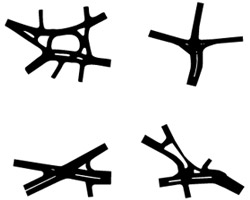
I don’t technically have any authority on the subject of logo design, but that won’t stop me from declaring that maps always—always—are the correct choice for logo designs. So while I attempt to cook up some more interesting projects to post here over the holidays, I leave you with this, my favorite logo lately:

That’s the logo of DARBI (the Davis Square Area Resident-Business Initiative), representing Davis Square in Somerville, Massachusetts. I moved to neighboring Cambridge several months ago and have become very aware that surface thoroughfares in Boston and environs are not long, continuous paths but rather connections between various neighborhood centers, whose central intersections often have a “Square” name. Most commonly, however, these “Squares” are nothing like that shape but instead are (as I am wont to describe it) clusterf***s of multitudes of one-way streets converging in a single spot. By car it is easy around here to travel between squares, but through them is another story entirely.
Davis Square (map) is no exception. But what is an exception is the attempt to assist motorists with this sign on approach to the intersection:

It’s a nice, simple map to help you quickly make sense of your five choices at the intersection. That map itself is something of an icon*, but the DARBI logo takes it a step further, stripping the map of its identifiers of map-ness.** That’s when a map logo achieves perfection in my eyes. It’s like a secret wink to cartographers; you’ve got to be one to realize that you’re actually looking at a map. Not true, I know, but sometimes you look for ways to make your line of work seem special.
Tagged Boston, interesting maps, logos | No comments
15 December 2008
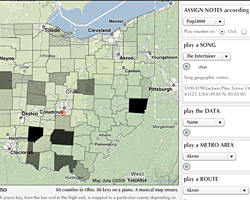
A while ago I wrote a summary of basic map panning and zooming methods along with demonstrations of most of them. There were a few requests for code examples for those demos, so (finally) I thought I’d outline some of the simple methods for doing it in Flash/ActionScript.
I’ve put together two AS files:
- A PanZoomMap class, with some simple panning and zooming methods.
- An example class that creates an instance of the PanZoomMap and demonstrates zooming, basic click and drag panning, and a zoom box.
The code has some simple comments that I hope give an idea of how it works. I’ll let them do the talking, as anything I write here is likely to be long-winded and confusing.
The example is really very basic. A real interactive map is likely to require some more complicated capabilities than what I have provided here, but this is a starting point that may be helpful to anyone who needs an introduction.
Here’s what the test file does. A simple click-and-drag pan/zoom example:
And a zoom box example:
Tagged as3, interactive maps | 3 comments
7 November 2008

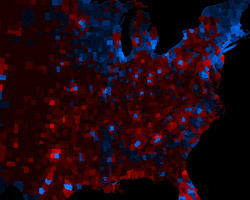
We’re working on putting together a few election maps and and graphs at Axis Maps, and above is one that we’ve come up with so far.
It’s a standard red-blue map indicating the winner of each county in the lower 48 states, where the transparency indicates the population of a county. The many counties with low population fade into the background, diminishing their visual prominence. This is meant to accomplish something similar to a cartogram, where sizes are distorted to show the actual distribution of votes. It’s step one of trying out alternatives to the cartograms that I complained about earlier this week. I won’t claim yet that it’s better… just different.
Tagged axis maps, election maps, map projects | 8 comments
5 November 2008
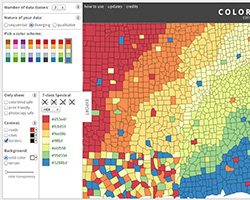
Attention cartographers: Cindy Brewer has allowed us at Axis Maps the privilege of making some updates to the fantastic ColorBrewer tool. We’d like suggestions from the community on what to change, what to keep the same, etc.
Drop us a line over here: ColorBrewer 2.0
Tagged axis maps, color | No comments
4 November 2008
I am not by nature an angry person—in fact my friends at times find me irritatingly even-tempered—nor am I known to truly hate anything, but provocative titles have their place, right?
We’ve once again arrived at that special time of (every fourth) year when the internet abounds with maps, charts, and other graphics attempting to depict and analyze every geographic and demographic angle of the US presidential election. I am happy for these, both in the perspectives they provide on the election and in the demonstration of interesting visualization methods.
But as a cartographer in the eternal quest for the Perfect Map, I find myself complaining about some map and graphics. In particular, I take exception to this:

For anyone who doesn’t know, the above is a cartogram (’bout time I wrote about that which my site is named after!) of the United States, in this case a map by Michael Gastner, Cosma Shalizi, and Mark Newman showing the results of the 2004 presidential election by county (we’ll soon be seeing one for 2008). A cartogram is a map that does not strive for geographic accuracy, but rather in which the area of units actually represents some value. In the election map, each county’s size represents its number of voters. The point of the map is to show that while a geographic red-blue election map would show an apparent vastness of Republican votes, those “red” areas actually account for about the same number of votes as the tiny “blue” areas. (The message is further conveyed by coloring counties along a red-blue continuum to show the actual balance of votes rather than simply coloring by the winner, something first seen in Robert Vanderbei’s election maps.)
I’ve written several drafts of many paragraphs to try to explain my opinion, but really, who has time to read all my ranting? Short version: apologies to Drs. Gastner and Newman, but as a cartographer interested in clear and effective design, I really believe that cartograms generated from their method are severely over-hyped and far more popular than they should be. Consider the election map (or any number of examples)…
- Ugly! All that puckering and bloating… I wouldn’t want to share an elevator with that America.
- Topology preservation at the expense of shape: even if I know what a county looks like on a normal map, I’m going to have a hard time identifying it here.
- On shape, still: curvy shape distortions are harder to recognize than simplified polygonal shapes.
- The overall distortions leave me gleaning only about five things from this map: east, west, Florida, Michigan, and that there is roughly the same amount of blue as red. Yes, I know that last one is the whole point, but if I can barely discern the geography, why bother to use a map? There are lots of cool visualization works that deserve attention too.
- Fast and easy cartograms (including this particular map) are not useless, and the work by Gastner and Newman is an important contribution, but there are under-appreciated careful designs out there. Consider the excellent cartograms from Mapping Worlds:

The bottom line is that many—perhaps even most—cartograms are essentially used for shock value, for the “holy crap, that’s a different perspective!” response, which is exactly what they get. Too frequently they can’t stand as maps on their own. I think the election cartogram is only of use when it’s next to an undistorted map. The best maps and graphics are those that tell their story clearly and elegantly, not those that simply evoke an emotional response. There are a million good reasons why I’m wrong to complain, but rather than going on and on in an attempt to counter them I will simply acknowledge that they exist and expound later if necessary.
“Put your money where your mouth is, jackass!”
Oh, actually that’s a pretty important reason I’m wrong to complain. Okay, I promise I will attempt to come up an alternative visualization of the same information as that election cartogram, as soon as I figure out where people find such detailed election data so quickly. (And, as I stressed “careful design,” it’s not going to be instant.) I’ll also keep an eye out in the coming days for maps and graphics that I think are more effective.
Having deleted most of what I previously wrote for this post, I wasn’t left with a good place to bring it up, but I must, as I seem to do in nearly every alternate post, refer to the work of my mortal enemy Zachary Johnson, who wrote his master’s thesis on cartogram designs in political maps. (He should be writing about this stuff. Maybe someday he’ll at least finally write about his findings. Eh, Joncy?) At the University of Wisconsin-Madison, specifically in room 412 Science Hall, we did not take cartographic research seriously if it could not be depicted by a cube. As such, Zach defined a cartogram typology (Cartogram3) by three characteristics: shape preservation, topology preservation (the preservation of boundaries and connectivity), and density equalization (essentially, how accurately area corresponds to value). No cartogram can be perfect in all three, and in fact most compromise all three to some degree. Zach tested several designs, each making different sacrifices, in political map-reading tasks. Note that I have bitched about shape preservation versus topology preservation. His research backs me up in some respects, but not in others. But I’m not in academia anymore; I don’t need “research” to know that I’m right!
Tagged cartograms, election maps, rants | 5 comments